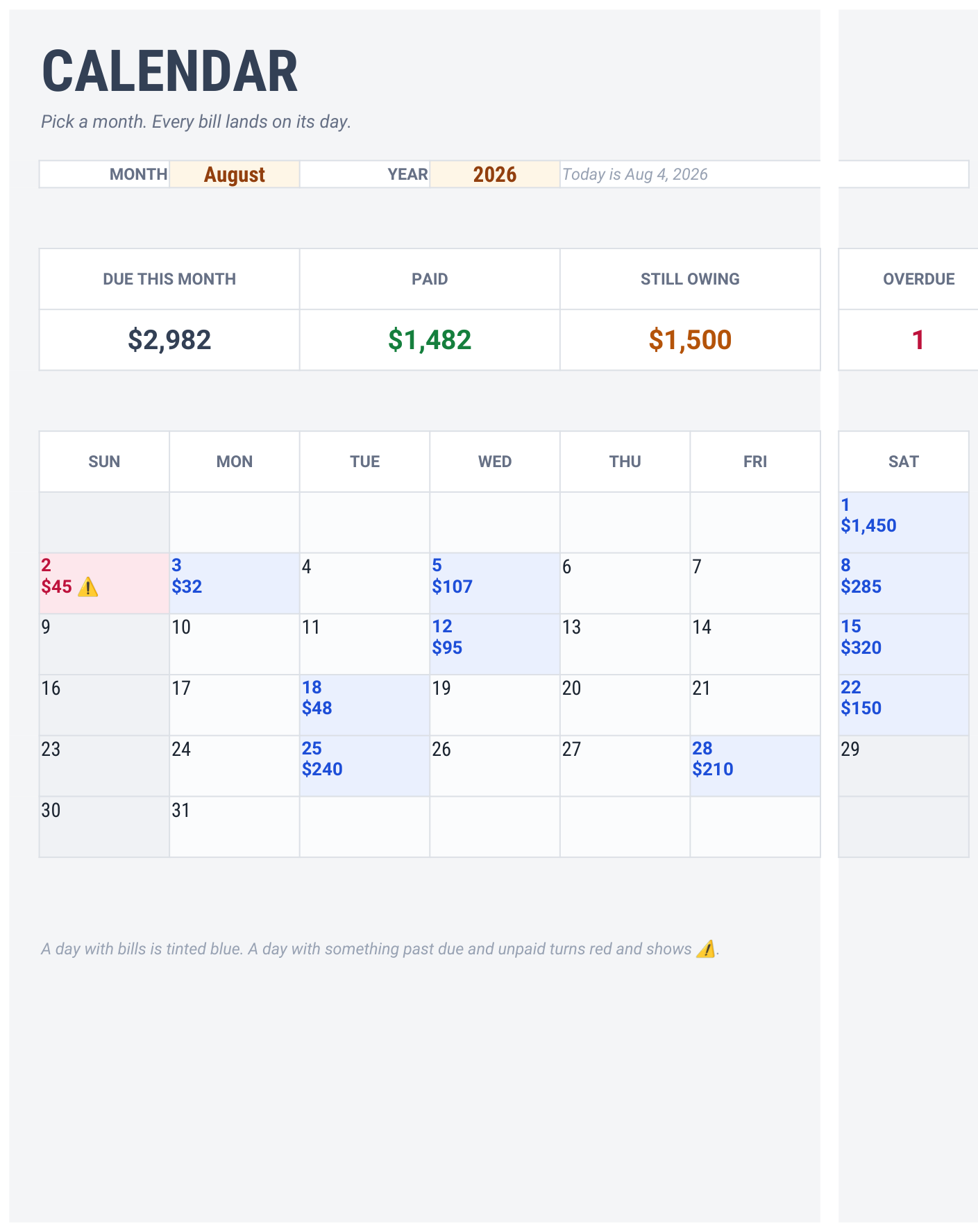
CALENDAR — a real month grid, every bill on the day it lands
A late fee is just money you set on fire for no reason.
Most bill trackers are a list. A list doesn't tell you that three bills land the same week your car insurance is due. A calendar does.
Days with bills tint blue. Anything past due and unpaid turns red.
No hunting, no scrolling. You look at the month and you know.
It handles the awkward ones.
Monthly, quarterly, half-yearly, annual — set the frequency once and the calendar works out which months it lands in. A bill due on the 31st automatically moves to the 28th in February instead of quietly disappearing. That last part sounds small until it's your rent.
Statuses look after themselves.
Every bill is marked PAID, OVERDUE, DUE SOON or UPCOMING against today's real date, so the sheet is correct every morning without you touching it.
The number nobody wants to see.
YEAR VIEW adds up all twelve months and shows what each category actually costs you per year. Subscriptions is usually the one that stings.
What's inside
6 tabs
CALENDAR — a real month grid, any month, any year, with daily totals and colour-coded warnings, plus this month's bills sorted by the day they land
BILLS — 25 slots with amount, due day, frequency, category and autopay
PAYMENTS — 300 rows, bill names as a dropdown
YEAR VIEW — twelve-month totals and a per-category annual cost breakdown
START HERE — plain-English setup
Sample bills preloaded so you can see it working, then clear them in seconds
Why this one
Checked, not eyeballed
No checkboxes to add, no scripts, no permissions — it just works, including on the Google Sheets mobile app
Every one of the 42 calendar cells is tested against an independent model, for every month of the year, including February and short months
Works in Google Sheets and Microsoft Excel — both files included
QA RECORD
Formulas854
Evaluation errors0
Independent checks231
Bugs caught before release3
231 checks including all 42 calendar cells verified character-for-character, re-run for all twelve months. Three real bugs caught before delivery, one of them serious.
What you get
A PDF with your Google Sheets link — open it, then File → Make a copy
An .xlsx file for Microsoft Excel
Instant download after purchase
Your data stays yours
You take a copy into your own Drive. Everything you type lives in your copy.
You can never edit the master, and I can never see a number in yours.
Good to know
Digital product — nothing is posted. You'll need a free Google account for the Sheets version, or Excel for the .xlsx. For personal use; please don't resell or redistribute the file.