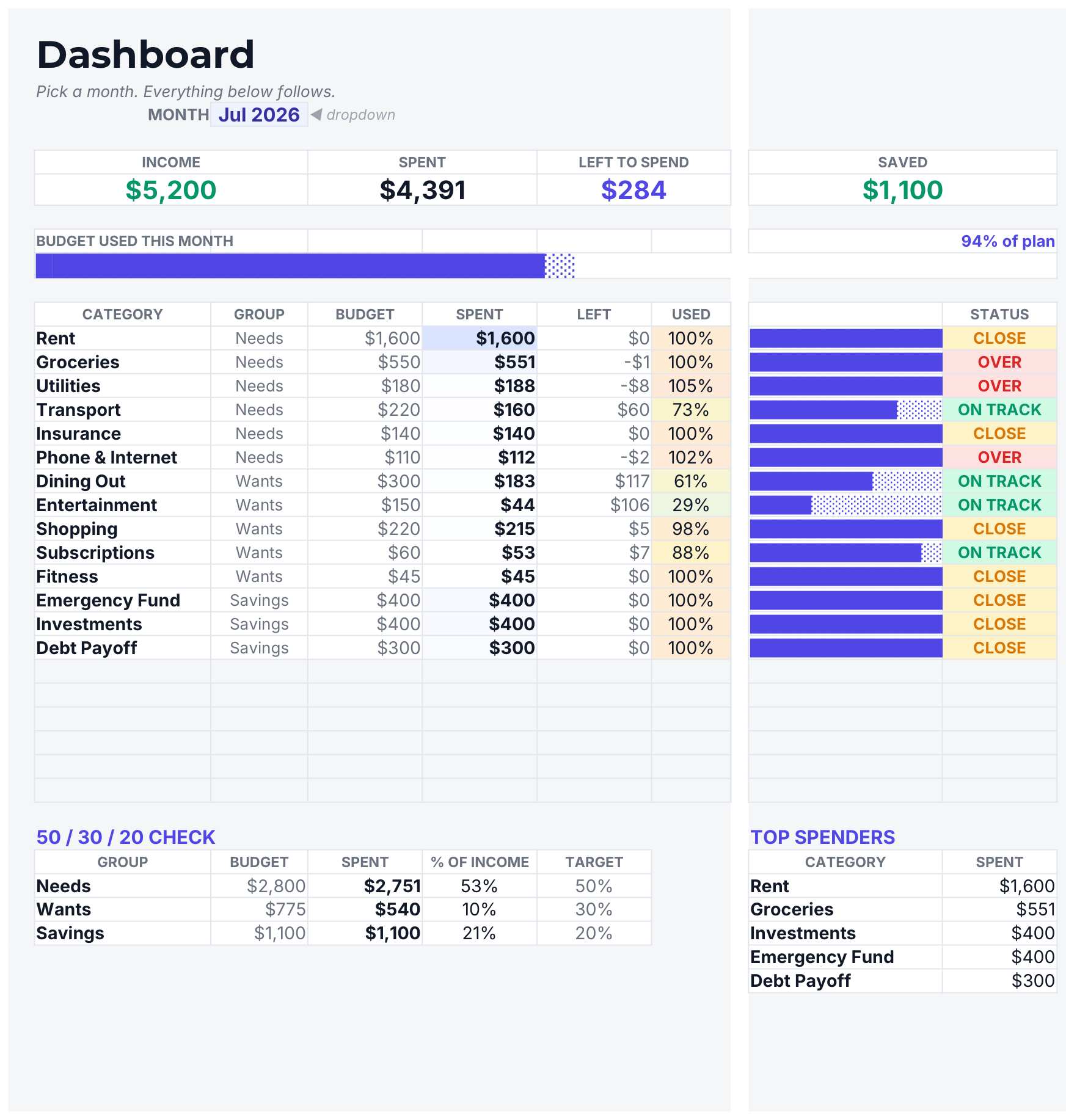
DASHBOARD — pick a month and the whole thing follows
Most budget templates are a list of numbers. This one is a dashboard.
Pick a month from the dropdown at the top and the whole thing follows — what came in, what went out, what's left, and exactly which categories are quietly eating your money.
You see the problem before you go looking for it.
Every category gets a bar and a status: green when you're on track, amber when you're close to the line, red when you've gone over. No hunting through rows. You glance at the colour and you know.
The 50/30/20 check, done properly.
Needs, wants and savings are measured against your actual income for that month, not your plan — so it tells you what really happened, not what you meant to happen.
Twelve months, side by side.
Income, spending, net and savings rate for every month, filling in as you go. The month you see the pattern is the month things change.
Top spenders, ranked.
Your five biggest categories for the month, worked out automatically. It is almost never the one you'd guess.
What's inside
6 tabs
DASHBOARD — month selector, four headline tiles, a 20-category table with colour-coded status, the 50/30/20 check and your top five spenders
SET UP — categories, budgets and Needs/Wants/Savings tags; done once in ten minutes
TRANSACTIONS — 500 rows with category and type as dropdowns, so nothing gets mistyped
TRENDS — twelve months of income, spend, net and savings rate
START HERE — plain-English setup
Sample data preloaded so you can see it working, then clear it in seconds
Why this one
Checked, not eyeballed
No checkboxes to add, no scripts, no permissions to grant — including on the Google Sheets mobile app
Every figure was tested against an independent recalculation, including the awkward cases: a month with no transactions, a category with no budget, and no income logged yet
Works in Google Sheets and Microsoft Excel — both files included
QA RECORD
Formulas358
Evaluation errors0
Independent checks140
Bugs caught before release1
140 checks over every tile, category row, group total, the top-spender ranking and all 12 trend rows. One real bug caught by that suite before delivery.
What you get
A PDF with your Google Sheets link — open it, then File → Make a copy
An .xlsx file for Microsoft Excel
Instant download after purchase
Your data stays yours
You take a copy into your own Drive. Everything you type lives in your copy.
You can never edit the master, and I can never see a number in yours.
Good to know
Digital product — nothing is posted. You'll need a free Google account for the Sheets version, or Excel for the .xlsx. For personal use; please don't resell or redistribute the file.